If you encounter the error "The policy is attached to 0 entities but it must be attached to a single role" while updating the CodeBuild image version in AWS, don't worry. This is a common issue related to IAM policies and service roles.
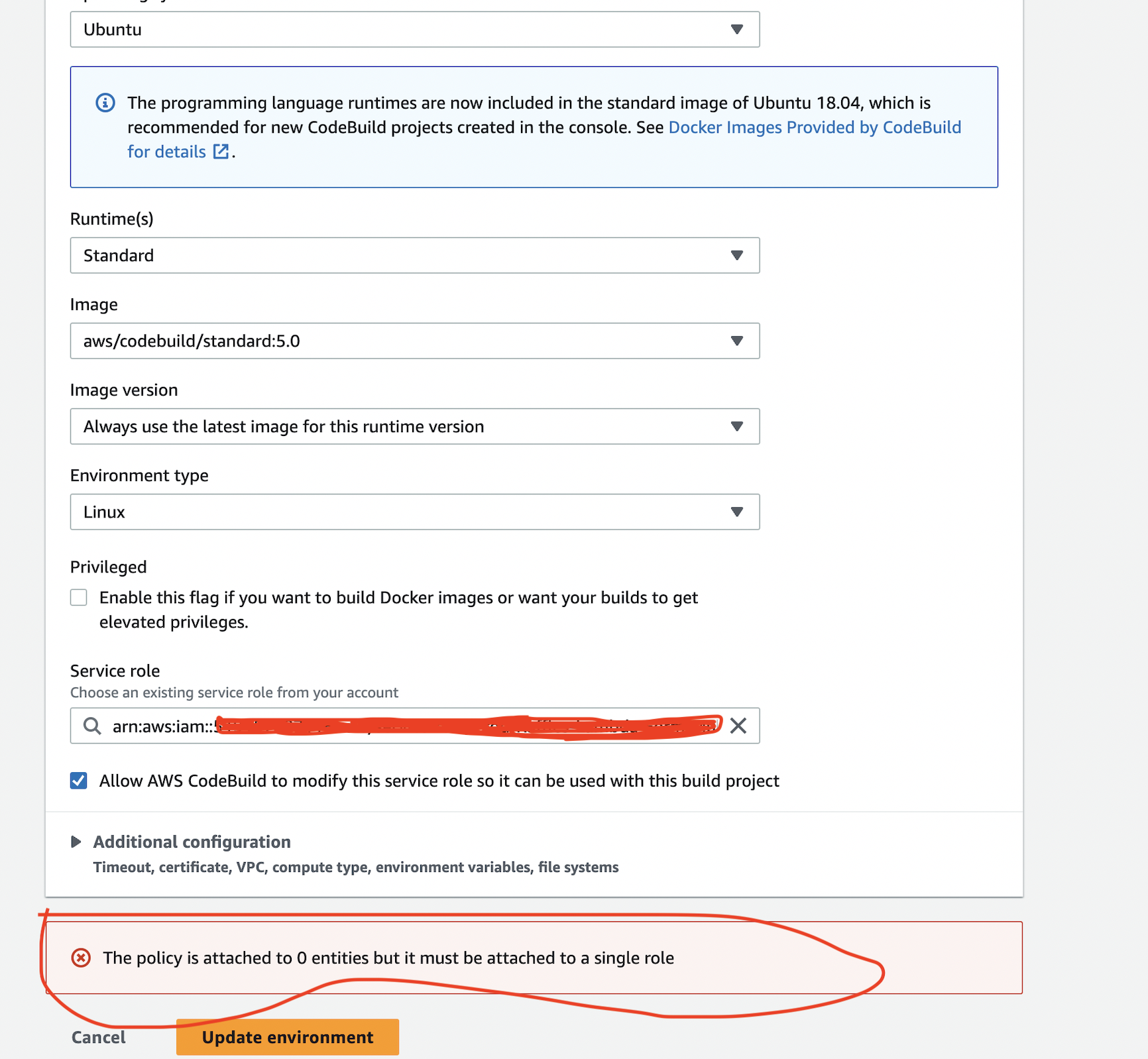
Error Details
This error occurs when the checkbox "Allow AWS CodeBuild to modify this service role so it can be used with the build project" is selected, but the generated policy is not attached to the service role.
Whenever you select this checkbox, CodeBuild automatically creates a policy in the format CodeBuildBasePolicy-project-name-region. If a policy already exists from previous builds, it must be attached to the service role of that CodeBuild project.
Solution
To fix this error, attach the policy CodeBuildBasePolicy-project-name-region to the corresponding service role used by your CodeBuild project.
Step-by-Step Instructions
1.  Open the AWS IAM console.
2.  Navigate to Roles.
3.  Search for the service role associated with your CodeBuild project.
4.  Search for the existing policy CodeBuildBasePolicy-project-name-region.
5.  Attach the policy to the selected service role.
Additional Tips
- Always ensure only one policy of this format is attached to the service role to avoid conflicts.
- If you delete a CodeBuild project and recreate it, verify the policy is still attached to the correct role.
- Use AWS CLI or Terraform for managing roles and policies programmatically for larger environments.
Following these steps will resolve the error and allow your CodeBuild project to work with the correct permissions.
For more AWS tutorials and troubleshooting tips, visit our Coding Beez blog.
Prakash Pradhan
Sr. Software Engineer
Senior Software Engineer with 10+ years of experience in designing and scaling distributed systems and full-stack applications. Experts in optimizing system performance, and delivering high-impact technical solutions across the entire software development lifecycle.







Comments
No comments yet.