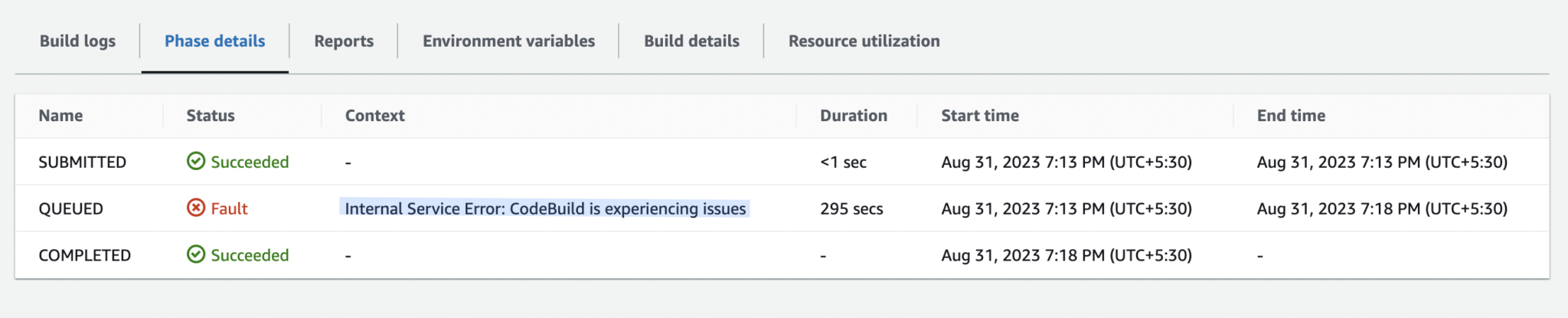
While a build is in the PROVISIONING phase in AWS CodeBuild, you may sometimes encounter the error:
“Internal Service Error: CodeBuild is experiencing issues”
At first glance, this error looks like a temporary AWS service outage, but in most cases, it is caused by configuration-related issues in your build setup rather than an actual AWS downtime.
Possible Causes of the Error
This error can occur due to multiple reasons, including:
- Using an unsupported or incorrect build image
- Missing or incorrect IAM permissions on the CodeBuild service role
- Invalid or misconfigured environment variables
- Environment variables exceeding the maximum allowed size
Most Common Root Cause
In most real-world scenarios, this error occurs because the total length of the environment variables configured for the build exceeds the maximum size that AWS CodeBuild can handle.
AWS CodeBuild enforces a combined maximum size of approximately 5,500 characters for all environment variables. If this limit is exceeded, the build may fail during the provisioning phase with an internal service error.
How to Fix the Issue
To resolve this problem, you can try one of the following approaches:
    1. Reduce the number or size of environment variables used in your build.
    2. Avoid storing large values such as certificates, JSON keys, or long tokens directly in environment variables.
    3. Store large configuration values securely using AWS Systems Manager Parameter Store and retrieve them dynamically in your buildspec.yml file.
Using AWS Systems Manager Parameter Store
AWS Systems Manager Parameter Store is a recommended and secure way to store large or sensitive configuration values. You can reference these parameters directly from your CodeBuild project or fetch them during the build process.
You can learn more about Parameter Store here:
https://docs.aws.amazon.com/systems-manager/latest/userguide/systems-manager-parameter-store.html
So the next time you encounter the error “Internal Service Error: CodeBuild is experiencing issues”, check your environment variables first — and you’ll likely resolve the issue quickly.
Happy coding!
Prakash Pradhan
Sr. Software Engineer
Senior Software Engineer with 10+ years of experience in designing and scaling distributed systems and full-stack applications. Experts in optimizing system performance, and delivering high-impact technical solutions across the entire software development lifecycle.






Comments
No comments yet.